Pokercraft: Analyze Your GGPoker Statistics
Your game’s story told in numbers
Every hand you’ve ever played on GGPoker is recorded. Every bluff, every hero call, every late-night session where you should have quit hours earlier. It’s all there, waiting to reveal exactly where you’re winning, where you’re losing, and what needs to change.
PokerCraft is GGPoker’s built-in analytics suite, and it’s one of the most powerful free tools in online poker. While other sites require third-party tracking software, GGPoker hands you a comprehensive database of your entire playing history. The question isn’t whether you should use it, but whether you’re using it correctly.
Let’s break down everything PokerCraft offers and how to turn that data into actual improvement.
Accessing PokerCraft
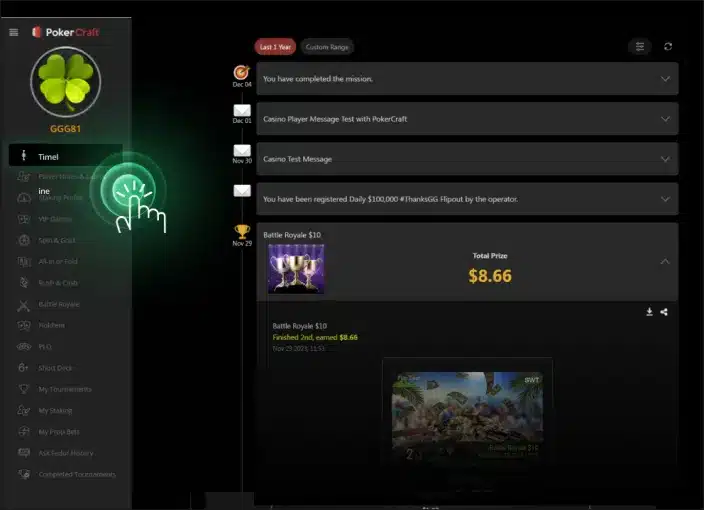
Finding PokerCraft is straightforward. From the GGPoker lobby, click on your profile icon and select “PokerCraft” from the menu. You can also access it through the mobile app, though the desktop version offers more detailed analysis tools.
The dashboard presents an overview of your recent results. However, this surface-level view barely scratches the surface of what’s available.
The Dashboard Overview
Your PokerCraft dashboard displays several key metrics at a glance:
- Total Hands Played – Your overall sample size
- Net Profit/Loss – The bottom line in dollars
- Win Rate – Your bb/100 (big blinds won per 100 hands)
- ROI – Return on investment for tournaments
- Session History – Recent playing sessions with results
Important note: PokerCraft displays results without taking rake into account. Your actual profits will be lower than the figures shown. Keep this in mind when evaluating your true win rate.
This overview is useful for a quick health check, but the real insights live in the detailed sections below.
Analyzing Your Statistics
Preflop Statistics
PokerCraft tracks the same stats displayed in Smart HUD, but for your own play. Here’s what to look for:
| Stat | Healthy Range (6-max) | Warning Signs |
| VPIP | 22-28% | Below 18% (too tight) or above 35% (too loose) |
| PFR | 18-24% | Large gap with VPIP suggests passive play |
| 3-Bet | 6-10% | Below 4% means you’re not defending enough |
| ATS | 35-50% | Below 30% leaves money on the table |
Compare your numbers to these ranges. Significant deviations indicate potential leaks. A VPIP of 40% suggests you’re playing too many marginal hands. An ATS of 25% means you’re not stealing enough when the opportunity arises.
Positional Statistics
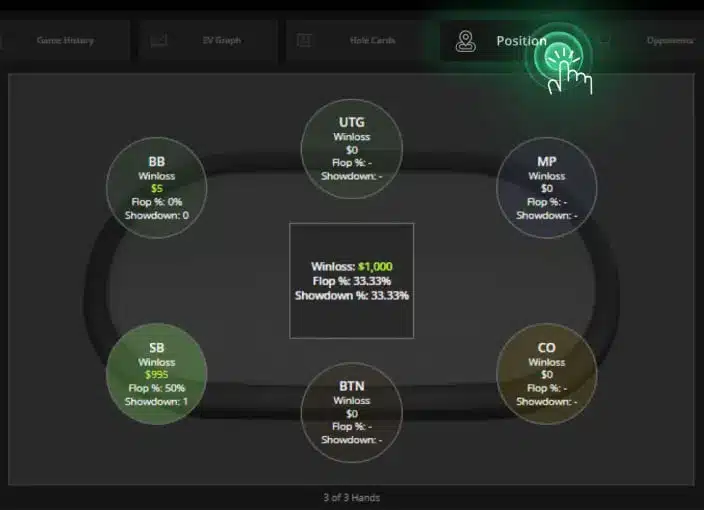
PokerCraft breaks down your results by position. This is where most players discover uncomfortable truths.
A common pattern: profitable from late position, break-even or losing from early position. This suggests opening too wide from under the gun or calling too many 3-bets out of position.
Check your positional win rates carefully. You should generally show:
- Button – Most profitable position
- Cutoff – Second most profitable
- Hijack – Slightly profitable to break-even
- Early Position – Break-even to slightly losing (due to blinds)
- Blinds – Losing (this is normal; you’re paying forced bets)
If your button win rate is negative, something is seriously wrong. If your small blind losses are enormous, you’re likely defending too wide or playing too passively.
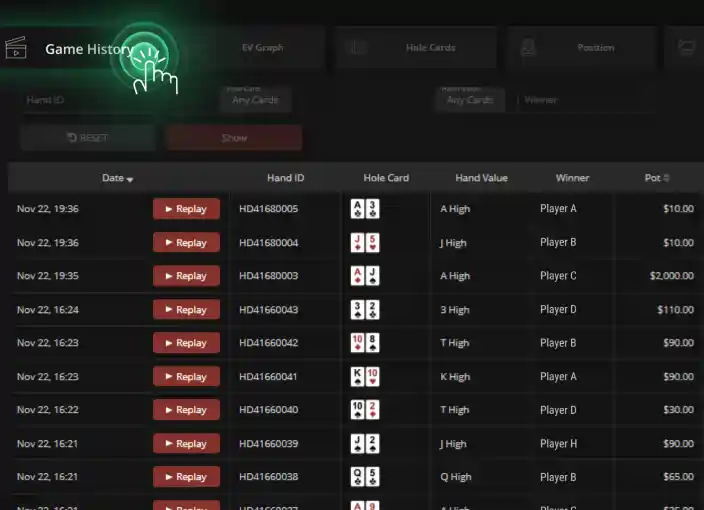
Hand History Browser
PokerCraft stores your hand histories, letting you review specific hands. This feature is crucial for identifying mistakes.
When reviewing hands:
- Filter by result – Look at your biggest losers first. These hands hurt your win rate the most.
- Check winning hands too – Sometimes you win despite making mistakes. Learn from those too.
- Focus on tough spots – River calls, big bluffs, marginal decisions. These are where improvement lives.
Don’t just look at the outcome. Analyze the decision. Did you have the correct reasoning? Would you make the same play again?
Finding Your Leaks
PokerCraft data reveals patterns. Here are some common leaks and how to spot them:
Leak 1: Losing Too Much in the Blinds
Everyone loses in the blinds. But how much is too much?
Check your BB defense stats. If you’re folding more than 70% of the time to steals, you’re giving up too easily. If you’re defending more than 50%, you might be calling too light.
The Fix: Review hands where you defended your big blind and lost. Are you calling with hands that can’t realize equity? Are you folding hands that should be 3-bet defends?
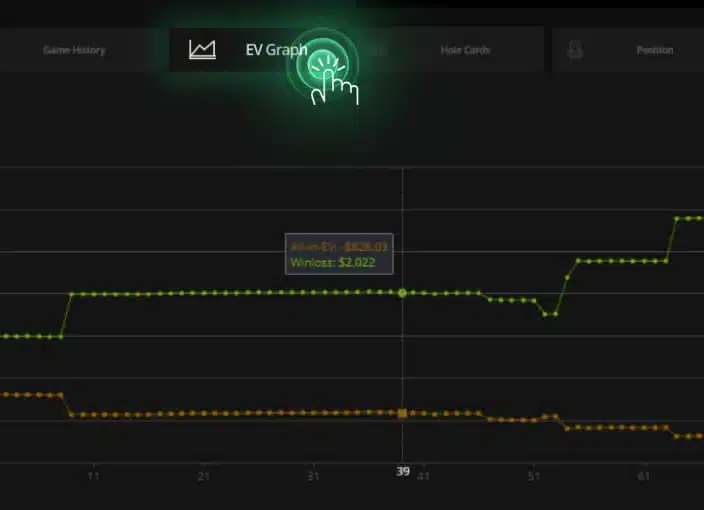
Leak 2: EV Graph Analysis
PokerCraft includes a “Luck” indicator displayed as a clover leaf with six levels, showing the ratio of your real wins/losses to expected value. This requires a minimum of 1,000 hands to populate.
Important: The EV calculation in PokerCraft only includes hands that reached showdown. Non-showdown hands aren’t factored in. If your actual results significantly trail your EV line, you may be running below expectations. If they’re above, you’re running hot.
The Fix: Focus on the long-term trend rather than short-term swings. A 1,000-hand sample is the minimum for any meaningful EV comparison.
Leak 3: Inconsistent Session Results
Look at your session history. Do you see wild swings? Sessions where you won 10 buy-ins followed by sessions where you lost 15?
Massive swings often indicate:
- Playing too many tables at once
- Tilting after bad beats
- Playing outside your optimal hours
- Taking shots at higher stakes unprepared
The Fix: Note the time, duration, and table count for your worst sessions. Patterns will emerge. Maybe you play poorly after midnight. Maybe four tables is your limit before quality drops.
Leak 4: Tournament vs Cash Disparities
PokerCraft separates tournament and cash game statistics. Some players crush one format but struggle with the other.
If your tournament ROI is negative but cash games are profitable, you might need to work on:
- Short stack play
- Bubble strategy
- ICM adjustments
If cash games are your weakness while tournaments profit, focus on:
- Deep stack play
- Table selection
- Session management
Tracking Progress Over Time
PokerCraft’s greatest value comes from tracking trends over time. Here’s how to use it effectively:
Set Baselines
Note your current statistics. VPIP, PFR, 3-bet, ATS, win rate by position. Write them down or screenshot them. These are your starting points.
Work on One Leak
Identify your biggest leak through the analysis above. Focus on fixing that one issue. Don’t try to overhaul your entire game at once.
Measure Results
After a significant sample (at least 10,000 hands for cash games or 100 tournaments), check your stats again. Did your numbers improve? Is your win rate trending upward?
Repeat
Once one leak is plugged, find the next biggest. Continuous improvement is the path to poker success.
PokerCraft vs Third-Party Tracking
Many serious players use external tracking software. How does PokerCraft compare?
| Feature | PokerCraft | Third-Party Software |
| Cost | Free | $60-100+ annually |
| Setup | Built-in | Requires installation and configuration |
| Stats Depth | Essential preflop stats | Hundreds of postflop stats available |
| Real-Time HUD | Smart HUD only | Fully customizable HUDs |
| Cross-Platform | GGPoker only | Multiple poker sites |
For recreational and intermediate players, PokerCraft provides everything needed to analyze and improve your game. Professional grinders might want additional tools, but most players will find PokerCraft sufficient.
Additional PokerCraft Features
Player Stats & Notes
The Player Stats & Notes section lets you search for any opponent by nickname and view their data. You can also write and edit notes on opponents here, which sync across your sessions.
Hand Moments
Every hand can be exported as a “Hand Moment”- a shareable image that captures the action. This feature lets you easily share notable hands on social media or with poker friends for discussion.
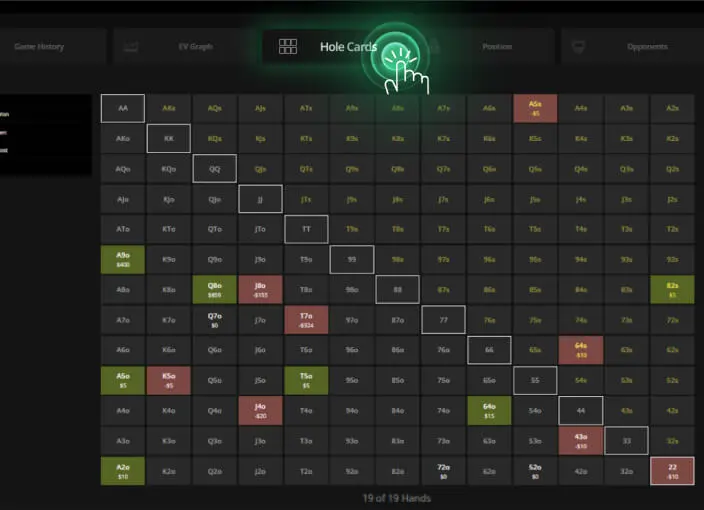
Best and Worst Hands
Each poker variant section shows your best and worst performing pocket hands, plus your strongest and weakest positions. Use this to identify which starting hands are costing you money.
Advanced PokerCraft Tips
- Export hand histories – Use exported hands for solver study or coaching sessions (available for games played in last 90 days)
- Track opponent notes – Use Player Stats & Notes to build profiles on regulars
- Review your biggest pots – Sort by pot size to find high-impact hands
- Compare stake levels – Your 25NL stats might differ from 50NL. Review separately.
- Use the replayer – Watch hands play out in the built-in hand replayer to spot mistakes
Building a Review Routine
PokerCraft works best when used consistently. Here’s a simple routine:
- Daily (5 minutes) – Glance at session results. Note anything unusual.
- Weekly (30 minutes) – Review 5-10 interesting hands. Check positional stats.
- Monthly (1-2 hours) – Deep dive into all statistics. Compare the statistics to the previous month. Identify the next area to improve.
This rhythm keeps you connected to your data without turning review into a time-consuming chore.
Key Takeaways
- PokerCraft is free and powerful – It’s your only tracking option since third-party HUDs are banned on GGPoker
- Results exclude rake – Your actual profit is lower than the displayed figures
- Luck indicator needs 1,000+ hands – EV calculations only include showdown hands
- Position breakdown matters – Your results by seat show where to focus improvement
- Use Hand Moments – Export and share notable hands for feedback and social sharing
- Track opponents – Player Stats & Notes lets you build profiles on regulars
Your Next Move
Open PokerCraft right now. Don’t just glance at your win rate and close it. Click through each section. Find your VPIP and PFR. Check your positional results. Pull up your five biggest losing hands from the past week and actually study them.
The data has been collecting since your first hand on GGPoker. It’s been waiting patiently to tell you exactly how to improve. All you have to do is listen.
Your next level is hidden in those numbers. Go find it.
About the Author: Shawn Altbaum has been writing and editing in the online gaming industry since 2007, reporting live from the WSOP Main Event and conducting interviews with professional players. An active poker player, he combines industry expertise with firsthand knowledge of the games he covers. He currently serves as Global Head of Copywriting at NSUS Group, overseeing brand voice and content strategy across GGPoker and GGVegas.