
Your Strategy Guide to GGPoker’s Smart HUD

Turn free information into profitable decisions.
You’re three-tabling on GGPoker when you notice something in the corner of your screen: four small numbers hovering next to each opponent’s name. Most players glance at them occasionally, perhaps checking one stat when facing a big decision.
GGPoker’s Smart HUD is one of the most underutilized tools in online poker. Unlike third-party HUDs that require separate software and subscriptions, Smart HUD is built directly into the client, completely free, and available to everyone at your table. The catch? Most players are unaware of how to effectively use it.
👉 Use Referral Code: WINBIG 👈PLAY TEXAS HOLD’EM POKER!
What Is the Smart HUD?
Smart HUD is a built-in feature unique to GGPoker that launched in 2018 and has been updated multiple times since. Since third-party HUDs and tracking software are prohibited on the platform, Smart HUD is your only way to track statistics on opponents during play.
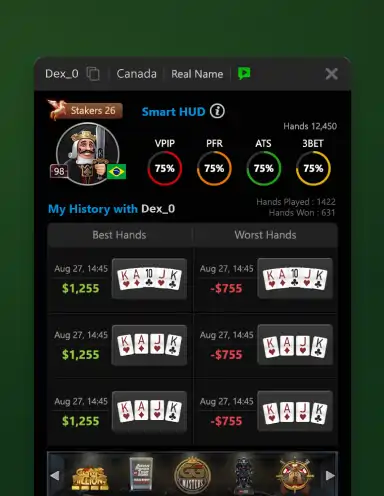
Smart HUD displays five key preflop statistics:
- VPIP (Voluntarily Put Money In Pot) – How often a player enters pots
- PFR (Pre-Flop Raise) – How often a player raises before the flop
- 3-Bet – How often a player re-raises a preflop raiser
- ATS (Attempt to Steal) – How often a player raises from late position
- Hands – Total hands played (your sample size indicator)
Critical limitation: Smart HUD collects data only for the current session and separately for each table. When you close a table or end your session, opponent stats reset. However, your own playing statistics are stored permanently in PokerCraft.
You’ll notice visual indicators around the VPIP number: flames appear around players who are running hot (winning), while ice appears around those running cold (losing).
Understanding Each Stat
VPIP: The Foundation Stat
VPIP tells you the single most important thing about any opponent: how many hands they play. A player with 15% VPIP is tight and selective. A player with 45% VPIP is playing nearly half their hands.
| VPIP Range | Player Type | What It Means |
| 8-15% | Very Tight | Only premium hands; respect their raises |
| 16-24% | Tight | Solid, selective player |
| 25-32% | Loose | Playing many hands; potential to exploit |
| 33%+ | Very Loose | Recreational player; value bet heavily |
Here’s the thing: VPIP alone doesn’t tell the whole story. A 30% VPIP player who raises every hand plays very differently from a 30% VPIP player who limps constantly. That’s where PFR comes in.
PFR: Aggression Indicator
PFR shows how often a player raises preflop. Compare it to VPIP, and you learn whether someone is aggressive or passive.
The Gap Matters: If VPIP is 25% and PFR is 22%, this player raises most hands they play. They’re aggressive. If VPIP is 25% and PFR is 8%, they’re calling a lot and raising rarely. They’re passive.
- Small gap (0-5%) – Aggressive player who raises when they enter
- Medium gap (6-12%) – Balanced between raising and calling
- Large gap (13%+) – Passive player who calls too much
Aggressive players are harder to play against but more predictable. Passive players are easier to value bet but trickier to bluff.
3-Bet: Re-Raise Frequency
The 3-bet stat shows how often someone re-raises after a player opens. This is crucial for understanding how to react to an opponent’s aggression.
A player with 3% 3-bet only re-raises with monsters. When they 3-bet you, proceed with extreme caution. A player with 12% 3-bet is re-raising light, including bluffs and semi-bluffs. You can call wider and even 4-bet bluff them occasionally.
Quick Reference:
- 2-4% – Only premiums (AA, KK, AK); fold everything but your best hands
- 5-8% – Standard range; proceed normally
- 9-12% – Aggressive; widen your calling range
- 13%+ – Very aggressive; look for 4-bet opportunities
ATS: Steal Attempt Frequency
ATS reveals how often a player raises from the cutoff, button, or small blind when the action folds to them. It’s your guide to defending your blinds.
Facing a player with 25% ATS? They’re only raising decent hands from late position. Respect it. Facing a player with 55% ATS? They’re stealing constantly. Time to fight back.
| ATS Range | Steal Tendency | Your Response |
| 20-30% | Conservative | Defend tighter, fold marginal hands |
| 31-45% | Standard | Defend normally |
| 46-60% | Aggressive | Defend wider, 3-bet more |
| 61%+ | Maniacal | 3-bet light frequently, call with any playable hand |
Putting Stats Into Action
Numbers mean nothing without application.
Scenario 1: Facing a Raise
The cutoff raises 2.5x. You’re on the button with A-J suited. Smart HUD shows: VPIP 18%, PFR 15%, 3-Bet 4%.
Analysis: This is a tight, aggressive player who rarely 3-bets. Their raise likely represents a strong range. A-J suited is marginal here. Calling is fine; 3-betting is risky because they’ll only continue with hands that crush you.
Scenario 2: Defending Your Big Blind
The button raises. You look down at K-9 offsuit. Smart HUD shows: VPIP 42%, PFR 28%, ATS 58%.
Analysis: This player is loose and stealing aggressively. K-9 offsuit is ahead of their wide stealing range. Defend by calling or even 3-betting as a bluff. Don’t let them run you over.
Scenario 3: Considering a 3-Bet
An early position player raises. You have pocket sevens in the hijack. Smart HUD shows: VPIP 12%, PFR 10%, 3-Bet 2%.
Analysis: This is an extremely tight player opening from early position. Their range is likely JJ+ and AK. Pocket sevens are crushed here. Fold and wait for a better spot.
Building Player Profiles
Combine the four stats to create instant player profiles:
- The Rock (VPIP 12%, PFR 10%, 3-Bet 3%, ATS 25%) – Plays premium hands only. Fold to their aggression unless you have the goods.
- The TAG (VPIP 22%, PFR 18%, 3-Bet 7%, ATS 40%) – Tight-aggressive regular. Respect their ranges but don’t over-fold.
- The LAG (VPIP 32%, PFR 26%, 3-Bet 11%, ATS 55%) – Loose-aggressive player. Fight back with wider ranges and don’t be intimidated.
- The Fish (VPIP 45%, PFR 12%, 3-Bet 2%, ATS 30%) – Passive recreational player. Value bet relentlessly, don’t bluff.
Accessing Detailed Stats
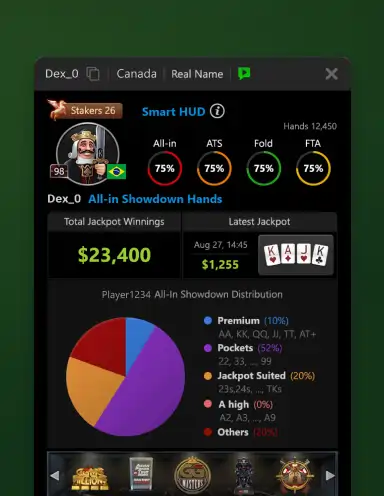
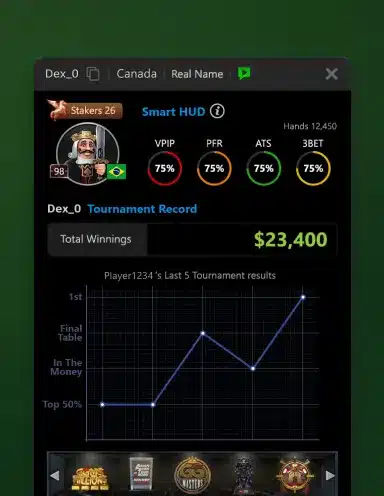
Clicking on a player’s avatar or Smart HUD icon reveals a pop-up with additional statistics broken down by street:
- CB (Continuation Bet) – How often the preflop raiser bets the flop
- FCB (Fold to Continuation Bet) – How often they fold to c-bets
- CCB (Call Continuation Bet) – How often they call c-bets
- RCB (Raise Continuation Bet) – How often they raise c-bets
- WT/WTSD (Went to Showdown) – How often they see showdowns after seeing the flop
- WSD/WMSD (Won Money at Showdown) – Win rate at showdown
- TAF (Total Aggression Frequency) – Overall aggression measure
The pop-up also shows your record against that specific player, including your three biggest pots played against them. In tournaments, you’ll see their total tournament winnings and current leaderboard rank.
Smart HUD Limitations
Before you rely too heavily on these stats, understand their limitations:
- Session-based only for opponents – This is the biggest limitation. Stats on other players reset when you leave the table or end your session. You cannot build long-term profiles.
- Sample size matters – Stats based on 20 hands are unreliable. Wait for 50 or more hands before making significant adjustments.
- Context changes – Tournament stats differ from cash game stats. Early tournament play differs from bubble play.
- Players adjust – Good players change their game within sessions. Don’t assume someone who was loose early will stay loose.
Maximizing Smart HUD Value
To get the most from Smart HUD:
- Check stats before every decision – Make it a habit, not an afterthought
- Focus on extremes – Players with very high or very low stats offer the most exploitable opportunities
- Combine with observation – Stats plus live reads equal maximum information
- Review your own stats – PokerCraft shows your Smart HUD numbers. Are you too predictable?

Your Next Move
Open GGPoker right now and look at the Smart HUD display. Those five numbers have been there all along, waiting to give you an edge. Click on a player’s avatar to explore the detailed pop-up stats.
Start with one stat. Focus on identifying high-VPIP players and value bet them more often. Once that becomes automatic, add another layer.
The information is free. The edge is yours to take.
About the Author: Shawn Altbaum has been writing and editing in the online gaming industry since 2007, reporting live from the WSOP Main Event and conducting interviews with professional players. An active poker player, he combines industry expertise with firsthand knowledge of the games he covers. He currently serves as Global Head of Copywriting at NSUS Group, overseeing brand voice and content strategy across GGPoker.